Migrating away from LearnDash? Move your courses, quizzes, students, and orders to a new WordPress LMS without losing anything important. Step by step.
Fame has evolved from traditional celebrity status to digital prominence, where online figures may lack universal recognition. Digital fame offers influence but is often more situational and fleeting.
Open Channels News discusses Alibaba’s Qwen AI model’s commercial restrictions, Mozilla’s view of AI as community-driven infrastructure, a critical WordPress update, and highlights from the upcoming WordCamp US.
The fastest and easiest way to add a chatbot to your WordPress site is with Hyve, a free WordPress chatbot plugin. It offers enough bandwidth for most light-traffic sites, such as personal blogs, smaller ecommerce stores, or sites representing a local brick-and-mortar business. If you have more extensive needs, it also offers a reasonably priced…
The official WordPress Browser Extension is now available for Google Chrome and Chromium-based browsers in the Chrome Web Store and for Safari on macOS in the Mac App Store. This new open source extension lets logged-in site users easily hide the admin bar while keeping its most helpful shortcuts in the browser toolbar, provides quick access to all of your WordPress sites, and adds helpful tools for developers and content creators.
By default, the admin bar sits at the top of every page you view while signed in to WordPress, keeping the dashboard, the editor, and your profile within reach. That convenience carries a cost: the bar occupies the viewport, so the page on screen is never quite the page a visitor sees. On sites doing more interesting things with the viewport, such as sticky headers or scroll-driven effects, it can introduce artifacts that send you hunting for a bug that is not there. Further, the admin bar can sometimes grow unwieldy as plugins add their own features and shortcuts to it. Switching it off in your profile settings trades one problem for another, because the shortcuts leave with it.
That problem was the spark for the creation of the WordPress Browser Extension. The extension hides the admin bar on the sites you choose, or everywhere by default, and keeps the most commonly used shortcuts one click away. Bringing the full bar back takes two clicks and no trip to the dashboard. What began as a fix for that one tradeoff grew into something broader: a way to recognize WordPress wherever you find it on the web, to jump into your own sites from anywhere, and to carry a small set of tools for testing and review.
As you browse, the toolbar icon shows whether the current site runs WordPress and whether you are signed in, without being obtrusive. On a site you manage, opening the extension reveals shortcuts to the dashboard or to the editor for the exact post, page, taxonomy, or template in view, including template-backed pages that open in the Site Editor on block themes. A locally stored launcher remembers the sites you sign in to, so they stay available even when you are somewhere else entirely.
A few tools also turn out to be a better fit for the browser than for a WordPress plugin. The extension can draw block boundaries over the rendered page, open a phone-sized preview window, reload with cache busting, or clear cookies and local storage for the site you are on. Some of that is hard to do from inside a site, and none of it requires a plugin or any other software installation, so the same tools are available on every WordPress site you visit.
All of this happens on your device. The extension reads the page in front of it to work out what it is looking at, and when it needs more than the page can tell it, it asks the site. Your preferences, and the list of sites you sign in to, stay in your browser. Nothing is sent anywhere else, and there is no tracking or analytics of any kind.
The extension began as an independent project and became an official project with active support from Matt Mullenweg. Notable contributors include Fabian Kägy, a core contributor and colleague at Fueled (formerly 10up), who helped shape much of its early design and architecture, and Khokan Sardar who contributed multiple patches. Several other Fueled colleagues provided comprehensive testing and influenced its final shape.
You can follow along with its development on its GitHub repository, where bug reports and pull requests are welcome.
Open Channels News discusses OpenWALDO’s launch, promoting true AI openness through transparent data sourcing, and AT&T’s shift to open models for cost savings and AI sovereignty.
WordPress 7.0’s AI connectors and wp_ai_client_prompt() give any plugin a provider-agnostic way to talk to LLMs. Learn the API and build a working plugin.
WordPress 7.0.4 is now available which features a security fix. Because this is a security release, it is recommended that you update your sites immediately.
You can update to WordPress 7.0.4 by downloading it from WordPress.org, or visiting your site’s Dashboard → Updates and clicking Update Now. Sites that support automatic background updates will begin updating shortly.
The security team would like to thank the team at pwn.ai for responsibly reporting the following vulnerability and allowing it to be fixed in this release:
Authenticated Author+ remote code execution via malicious file upload on sites that use Imagick and Ghostscript.
Backports
As a courtesy, these fixes are being backported through to the 4.7 branch and the 7.1 RC3 release that’s due later today. As a reminder, only the most recent version of WordPress is actively supported. The backports are in progress and will ship as they become ready.
This release was led by John Blackbourn, with significant input from Dennis Snell and Jeremy Felt. In addition, WordPress 7.0.4 and its backports would not have been possible without the valuable contributions of the following people:
 Want a WordPress AI chatbot that answers from your own posts and pages? Learn how RAG actually works, then set up Hyve Lite free, limits and all.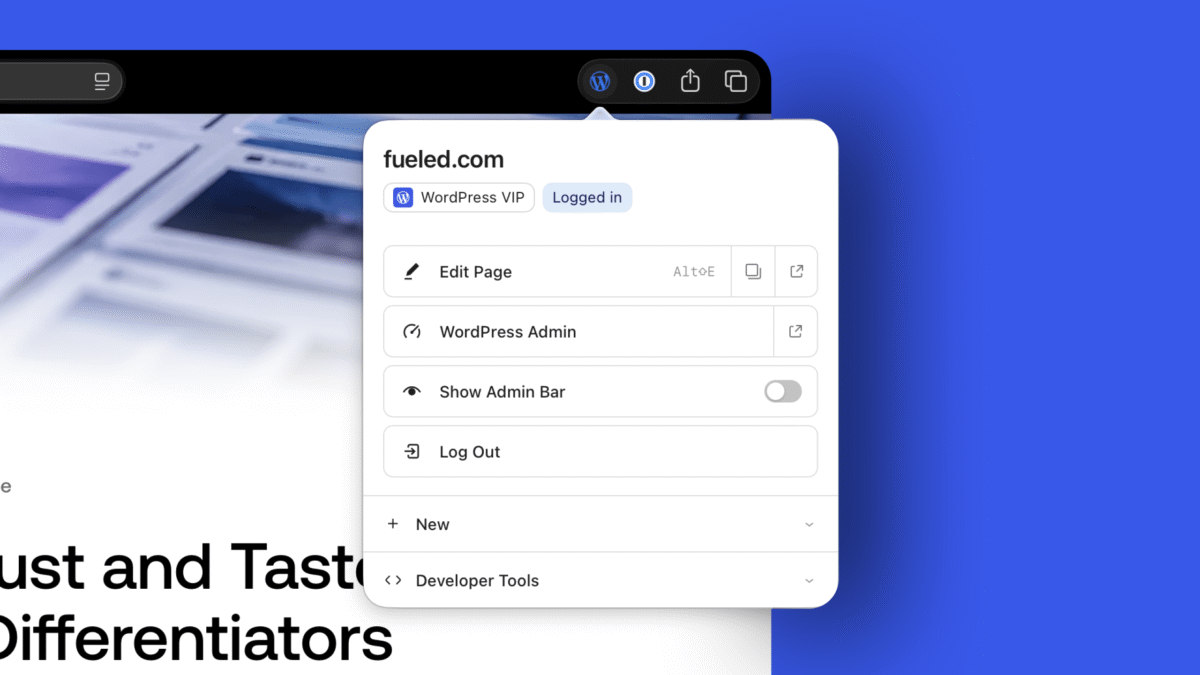


 WordPress 7.0’s AI connectors and wp_ai_client_prompt() give any plugin a provider-agnostic way to talk to LLMs. Learn the API and build a working plugin.